


The Hidden Risks Lurking in Your Cloud
This episode exposes the most significant — and often hidden — cloud security risks in Microsoft 365 and Azure. It cuts through marketing claims with real attack examples, misconfiguration failures, and lessons learned from actual incident response timelines. Listeners hear how a single oversight led to a multimillion-dollar data leak and how attackers commonly enumerate Microsoft 365 tenants, move laterally, and exploit weak Azure configurations.
The episode covers the current threat landscape, the top five risks across Microsoft 365 and Azure, and a detailed breach case study involving conditional access mistakes and an unsecured storage account. You’ll get practical hardening guidance using Microsoft Defender for Cloud, plus a set of quick security checks you can perform in under 30 minutes. Long-term strategies include identity-first design, enforcing least privilege, improving visibility with logging and alerts, and using continuous monitoring tools.
Key takeaways emphasize that identity is the primary target, permissions sprawl is widespread, and visibility is essential to defense. The episode provides a prioritized action plan for organizations with limited resources and explains how to build resilience through segmentation, secure defaults, and regular testing.
It’s aimed at IT and security leaders, cloud architects, engineers, and anyone responsible for protecting Microsoft 365 or Azure environments. Listeners walk away with clear steps to tighten security immediately and reduce the chance of a costly breach.


Secure Microsoft Cloud: Azure & Microsoft 365 Security Risks
In today's digital landscape, securing your Microsoft cloud environment is paramount. With the increasing reliance on cloud computing, understanding the security risks associated with Microsoft Azure and Microsoft 365 is crucial. This article delves into the common threats and vulnerabilities that organizations face when using these cloud services, providing insights into how to enhance your security posture and protect your valuable data. We will explore the significance of proactive security measures to safeguard your cloud assets and maintain a secure cloud environment.
Understanding Cloud Security Risks
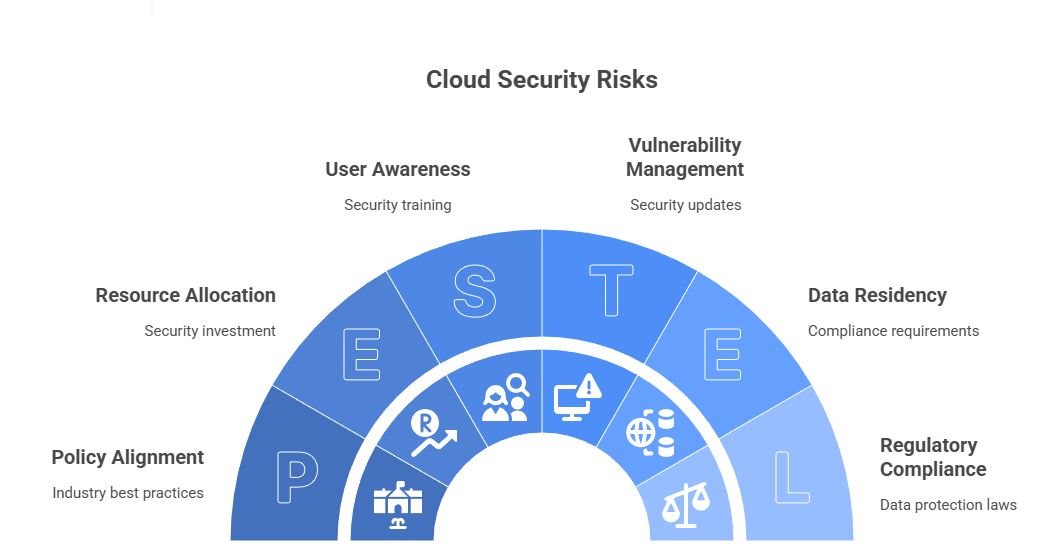
Overview of Security Threats in Cloud Environments
Cloud environments, while offering numerous benefits, also present unique security challenges. Security threats in cloud environments can range from data breaches and unauthorized access to malware infections and denial-of-service attacks. These threats exploit vulnerabilities in the cloud infrastructure, applications, or user configurations. A common entry point is through misconfigured security settings, leaving cloud data exposed. Effective security management requires a comprehensive understanding of these potential security risks and the implementation of robust security controls to mitigate them. Understanding the threat landscape is the first step in building a secure cloud posture.
Common Risks Associated with Microsoft Azure and Microsoft 365
Microsoft Azure and Microsoft 365, while offering robust security features, are not immune to security risks. Common risks include misconfigurations, particularly in Azure Active Directory (Azure AD), leading to unauthorized access. Unsanctioned apps, often referred to as shadow IT, pose a significant risk as they operate outside the purview of the security team. Vulnerabilities in Microsoft 365 apps, if not promptly addressed through security updates, can be exploited. Protecting sensitive data in both Azure storage and Microsoft 365 requires a multi-layered approach. Regularly assessing your Azure security and Microsoft 365 security configurations is essential to find and address potential security gaps. Implementing network security best practices is critical for Microsoft 365 and Azure.
Importance of Security Posture in Cloud Security
Maintaining a strong security posture is vital for protecting your Microsoft cloud environment. A good cloud security posture involves continuous security monitoring, regular security assessments, and the proactive identification and remediation of security gaps. It's essential to establish a security baseline and implement security policies that align with industry best practices. Security teams should leverage security tools like Microsoft Defender for Cloud to detect and respond to security events and potential security incidents. Improving your cloud security posture helps minimize the likelihood of a security breach and ensures the confidentiality, integrity, and availability of your cloud resources. Trust in cloud security is earned through diligence and a commitment to maintaining a secure environment.
Best Practices for Securing Azure and Microsoft 365
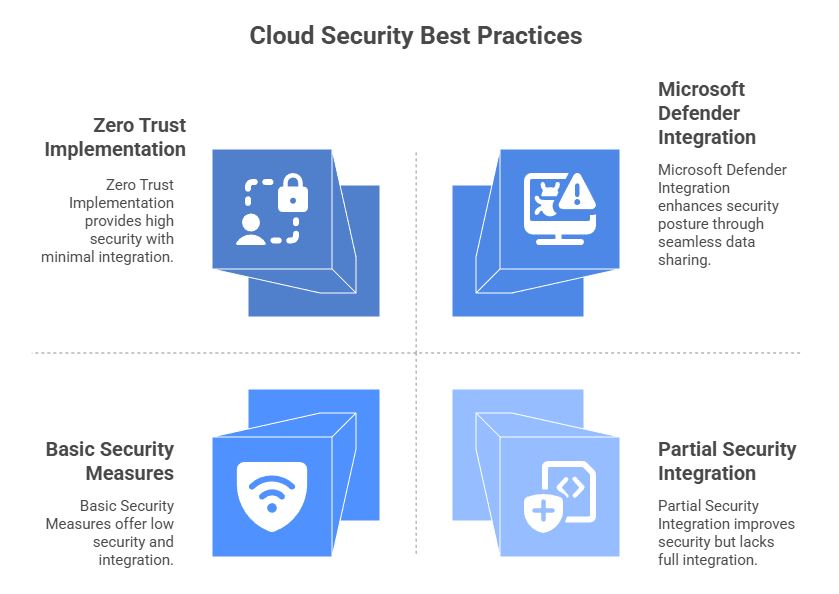
Implementing Microsoft Defender Across Your Cloud Environment
Implementing Microsoft Defender across your cloud environment is a best practice for enhancing your security posture. Microsoft Defender for Cloud provides advanced security threat detection and response capabilities for both Azure and Microsoft 365 environments. It helps security teams detect potential security incidents by continuously monitoring your cloud resources and identifying security risks. Microsoft Defender offers a unified security management platform, enabling you to streamline security operations and improve your overall cloud security. Regular security monitoring with Microsoft Defender ensures that your Azure security and Microsoft 365 security are up to par. Using these security tools enables a proactive approach, helping to secure sensitive data effectively and maintain a secure cloud environment.
Establishing a Zero Trust Security Model
Establishing a Zero Trust security model is critical for securing your Azure and Microsoft 365 cloud environment. Zero Trust operates on the principle of "never trust, always verify," requiring strict identity verification for every user and device attempting to access cloud resources. This model minimizes the risk of unauthorized access and lateral movement within your Azure environment and Microsoft 365 environment, even if a security breach occurs. Implementing multi-factor authentication (MFA), least privilege access, and network segmentation are key components of a Zero Trust strategy. By adopting Zero Trust, organizations can significantly enhance their cloud security posture and protect against advanced security threats.
The M365 Show Podcast covers Zero Trust.
Regularly assessing and refining your Zero Trust implementation is essential to adapt to evolving security risks. The M365 Show Podcast delves into Zero Trust, offering expert insights and practical guidance.
Enhancing Cloud Security Posture through Integration
Enhancing your cloud security posture involves integrating various security tools and services within your Azure and Microsoft 365 environment. Integration allows for seamless data sharing and collaboration between different security solutions, providing a holistic view of your security landscape. For example, integrating Microsoft Defender with Azure Sentinel enables advanced threat intelligence and incident response capabilities. Ensuring that your security tools are properly configured and integrated helps to detect and respond to potential security incidents more effectively. Regularly reviewing and updating your security integration strategy is crucial for maintaining a strong cloud security posture. Leveraging Microsoft Learn can provide valuable insights into optimizing security integrations and reducing potential security gaps across your cloud environment.
Assessing and Managing Security Risks
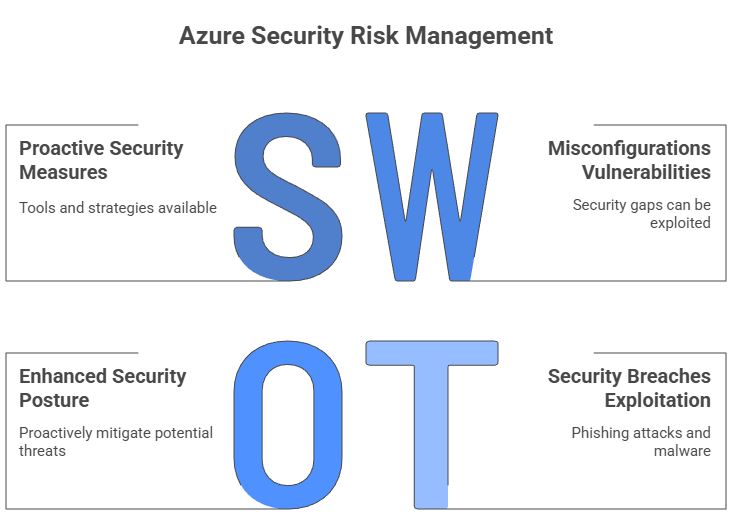
Identifying Risks in Azure Security
Identifying security risks in your Microsoft Azure environment is a critical aspect of maintaining a strong cloud security posture. Start by thoroughly assessing your Azure resources for misconfigurations, as even small misconfigurations can create significant risk. Use Microsoft Defender for Cloud to help detect potential security incidents and vulnerabilities. Pay close attention to network security configurations, ensuring that your virtual networks and subnets are properly segmented and protected. Regular security monitoring of your Azure environment helps to find and address security gaps before they can be exploited. Understanding the common security risks associated with Azure services allows your security team to proactively mitigate potential threats and secure sensitive data effectively. Properly managing Azure security is vital for safeguarding your cloud resources and maintaining trust in your cloud services.
Tools and Strategies for Risk Management
Effective risk management in Microsoft Azure and Microsoft 365 requires a combination of the right security tools and well-defined strategies. Microsoft Defender for Cloud is an essential security tool for identifying security threats and misconfigurations. Implementing a Zero Trust security model helps to minimize the impact of potential security breaches. Security teams should also use threat intelligence feeds to stay informed about the latest security risks. Regularly performing security assessments and penetration tests can help to identify security gaps. Strategies such as least privilege access and multi-factor authentication enhance your overall security posture. By leveraging these tools and strategies, organizations can proactively manage security risks and secure their cloud environment effectively. The M365 Show Podcast often discusses strategies for mitigating security risks.
Creating a Secure Microsoft 365 Tenant
Creating a secure Microsoft 365 tenant involves several key steps to protect your cloud data and maintain a strong security posture. A few of these important steps include:
- Implementing multi-factor authentication (MFA) for all users to prevent unauthorized access.
- Configuring Azure Active Directory (Azure AD) security policies to enforce strong password requirements and conditional access controls.
- Regularly reviewing and updating your Microsoft 365 security settings to address potential security risks.
- Using Microsoft Defender for Office 365 to detect and respond to security threats such as phishing attacks and malware.
Ensure that your users are trained on security best practices to prevent them from falling victim to social engineering attacks. Monitor your Microsoft 365 environment for unsanctioned apps and shadow IT, as these can introduce security vulnerabilities. By taking these steps, you can create a secure Microsoft 365 environment and protect your sensitive data. Remember to establish a security baseline for your Microsoft 365 tenant to ensure ongoing security and compliance.
Building a Secure Cloud Environment
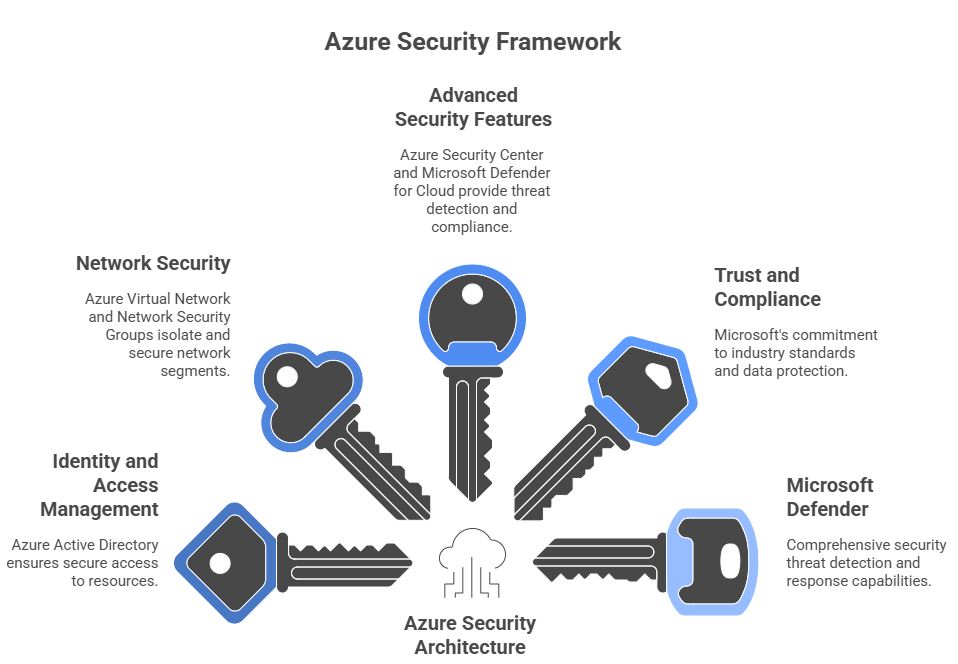
Key Components of Azure Security Architecture
The key components of the Azure security architecture are designed to create a secure cloud environment, mitigating security risks and ensuring that your data remains protected. At the core, Azure Active Directory (Azure AD) provides identity and access management, controlling who can access what resources. Network security is crucial, with Azure Virtual Network and Network Security Groups enabling you to isolate and secure network segments. Azure also offers advanced security features, such as Azure Security Center and Microsoft Defender for Cloud, which provide threat detection, security monitoring, and compliance assessments. Regularly assessing and updating your security posture helps find and address security gaps. Integrating these components effectively enhances Azure security and reduces the risk of misconfigurations. Understanding these components is vital for maintaining a strong cloud security posture and securing your Azure cloud resources.
Trust and Compliance in Microsoft Cloud Solutions
Trust and compliance are paramount in Microsoft cloud solutions, particularly when handling sensitive data in environments like Azure and Microsoft 365. Microsoft invests heavily in security features and certifications to maintain customer trust. Compliance with industry standards such as GDPR, HIPAA, and ISO 27001 demonstrates Microsoft's commitment to data protection. Microsoft Defender helps to detect and address security threats, ensuring that your cloud environment remains secure. Regularly review compliance requirements and use Microsoft Learn to stay updated on best practices. Understanding Microsoft's compliance framework builds trust in their cloud services and helps organizations meet their regulatory obligations. Strong compliance practices also enhance your overall security posture, reducing the potential for security incidents and breaches.
Leveraging Microsoft Defender for Enhanced Security
Leveraging Microsoft Defender is essential for enhanced security across your Microsoft 365 and Azure environment, offering comprehensive security threat detection and response capabilities. Microsoft Defender for Cloud provides security monitoring and threat intelligence, helping the security team detect potential security incidents. For Microsoft 365, Microsoft Defender for Office 365 protects against phishing attacks and malware. Using Microsoft Defender helps you maintain a strong security posture and secure sensitive data. Regularly review security events and alerts generated by Microsoft Defender to find and address security gaps. Integrating Microsoft Defender with other security tools enhances your overall cloud security posture and improves your ability to respond to security threats effectively. The M365 Show Podcast covers Defender, offering insights on how to optimize its use for your cloud environment.
What happens when the software you rely on simply doesn’t show up for work? Picture a Power App that refuses to submit data during end-of-month reporting. Or an Intune policy that fails overnight and locks out half your team. In that moment, the tools you trust most can leave you stranded. Most cloud contracts quietly limit the provider’s responsibility — check your own tenant agreement or SLA and you’ll see what I mean. Later in this video, I’ll share practical steps to reduce the odds that one outage snowballs into a crisis. But first, let’s talk about the fine print we rarely notice until it’s too late.
The Fine Print Nobody Reads
Every major cloud platform comes with lengthy service agreements, and somewhere in those contracts are limits on responsibility when things go wrong. Cloud providers commonly use language that shifts risk back to the customer, and you usually agree to those terms the moment you set up a tenant. Few people stop to verify what the document actually says, but the implications become real the day your organization loses access at the wrong time. These services have become the backbone of everyday work. Outlook often serves as the entire scheduling system for a company. A calendar that fails to sync or drops reminders isn’t just an inconvenience—it disrupts client calls, deadlines, and the flow of work across teams. The point here isn’t that outages are constant, but that we treat these platforms as essential utilities while the legal protections around them read more like optional software. That mismatch can catch anyone off guard. When performance slips, the fine print shapes what happens next. The provider may work to restore service, but the time, productivity, and revenue you lose remain your problem. Open your organization’s SLA after this video and see for yourself how compensation and liability are described. Understanding those terms directly from your agreement matters more than any blanket statement about how all providers operate. A simple way to think about it is this: imagine buying a car where the manufacturer says, “We’ll repair it if the engine stalls, but if you miss a meeting because of the breakdown, that’s on you.” That’s essentially the tradeoff with cloud services. The car still gets you where you need to go most of the time, but the risk of delay is yours alone. Most businesses discover that reality only when something breaks. On a normal day, nobody worries about disclaimers hidden inside a tenant agreement. But when a system outage forces employees to sit idle or miss commitments, leadership starts asking: Who pays for the lost time? How do we explain delays to clients? The uncomfortable answer is that the contract placed responsibility with you from the start. And this isn’t limited to one product. Similar patterns appear across many service providers, though the language and allowances differ. That’s why it matters to review your own agreements instead of assuming liability works the way you hope. Every organization—from a startup spinning up its first tenant to a global enterprise—accepts the same basic framework of limited accountability when adopting cloud services. The takeaway is straightforward. Running your business on Microsoft 365 or any major platform comes with an implicit gamble: the provider maintains uptime most of the time, but you carry the consequences when it doesn’t. That isn’t malicious, it’s simply the shared responsibility model at the heart of cloud computing. The daily bet usually pays off. But on the day it doesn’t, all of the contracts and disclaimers stack the odds so the burden falls on you. Rather than stopping at frustration with vendors, the smarter move is to plan for what happens when that gamble fails. Systems engineering principles give you ways to build resilience into your own workflows so the business keeps moving even when a service goes dark. And that sets us up for a deeper look at what it feels like when critical software hits a bad day.
When Software Has a Bad Day
Picture this: it’s the last day of the month, and your finance team is racing against deadlines to push reports through. The data flows through a Power App connected to SharePoint lists, the same way it has every other month. Everything looks normal—the app loads, the fields appear—but suddenly nothing saves. No warning. No error. Just silence. The process that worked yesterday won’t work today, and now everyone scrambles to meet a compliance deadline with tools that have simply stopped cooperating. That’s the unsettling part of modern business systems. They appear reliable until the day they aren’t. Behind the scenes, most organizations lean on dozens of silent dependencies: Intune policies enforcing security on every laptop, SharePoint workflows moving invoices through approval, Teams authentication controlling access to meetings. When those processes run smoothly, nobody thinks about them. When something falters, even briefly, the effects multiply. One broken overnight Intune policy can lock users out the next morning. An automated approval chain can freeze halfway, leaving documents in limbo. An authentication error in Teams doesn’t just block one person; entire departments can find themselves cut off mid-project. These situations aren’t abstract. Administrators and end users trade war stories all the time—lost mornings spent refreshing sign-in screens, hours wasted when files wouldn’t upload, stalled projects because a workflow silently failed. A single outage doesn’t just delay one person’s task; it can strand entire teams across procurement, finance, or client services. The hidden cost is that people still show up to do their work, but the systems they rely on won’t let them. That gap between willing employees and failing technology is what makes these episodes so damaging. Service status dashboards exist to provide some visibility, and vendors update them when widespread incidents occur. But anyone who’s lived through one of these outages knows how limited that feels. You can watch the dashboard turn from yellow to green, but none of that gives lost time or missed deadlines back. The hardest lesson is that outages strike on their own schedule. They might hit overnight when almost no one notices—or they might land in the middle of your busiest reporting cycle, when every hour counts. And yet, the outcome is the same: you can’t bill for downtime, you can’t invoice clients on time, and your vendor isn’t compensating for the gap. That raises a practical question: if vendors don’t make you whole for lost time, how do you protect your business? This is where planning on your own side matters. For instance, if your team can reasonably run a daily export of submission data into a CSV or keep a simple paper fallback for critical approvals, those steps may buy you breathing room when systems suddenly lock up. Those safeguards work best if they come from practices you already own, not just waiting for a provider’s recovery. (If you’re considering one of these mitigations, think carefully about which fits your workflows—it only helps if the fallback itself doesn’t create new risks.) The truth is that downtime costs far more than the minutes or hours of disruption. It reshapes schedules, inflates stress, and forces leadership into reactive mode. A single failed app submission can cascade upward into late compliance reports, which then spill into board meetings or client promises you now struggle to keep. Meanwhile, employees left idle grow increasingly disengaged. That secondary wave—frustration and lost confidence in the tools—is as damaging as the technical outage itself. For managers, these failures expose a harsh reality: during an outage, you hold no leverage. You submit a ticket, escalate the issue, watch the service health updates shift—but at best, you’re waiting for a fix. The contract you accepted earlier spells it out clearly: recovery is best effort, not a guarantee, and the lost productivity is yours alone. And that frustration leads to a bigger realization. These breakdowns don’t always exist in isolation. Often, one failed service drags down others connected beneath the surface, even ones you may not realize depended on the same backbone. That’s when the real complexity of software failure shows itself—not in a single app going silent, but in how many other systems topple when that silence begins.
The Hidden Web of Dependencies
Ever notice how an outage in one Microsoft 365 app sometimes drags others down with it? Exchange might slow, and suddenly Teams calls start glitching too. On paper those look like separate services. In practice, they share deep infrastructure, tied through the same supporting components. That’s the hidden web of dependencies: the behind‑the‑scenes linkages most people don’t see until service disruption spreads into unexpected places. This is what turns downtime from an isolated hiccup into a chain reaction. Services rarely live in airtight compartments. They rely on shared foundations like authentication, storage layers, or routing. A small disturbance in one part can ripple further than users anticipate. Imagine a row of dominos: tip the wrong one, and motion flows down the entire line. For IT, understanding that cascade isn’t about dramatic metaphors—it’s about identifying which few blocks actually hold everything else up. A useful first step: make yourself a one‑page checklist of those core services so you always know which dominos matter most. Take identity, for instance. Your tenant’s identity service (e.g., Azure AD/Entra) controls the keys to almost everything. If the sign‑in process fails, you don’t just lose Teams or Outlook; you may lose access to practically every workload connected to your tenant. From a user’s perspective, the detail doesn’t matter—they just say “nothing works.” From an admin’s perspective, this makes troubleshooting simple: if multiple Microsoft apps suddenly fail together, your first diagnostic step should be to ask, “Is this identity? Is this DNS? Or is a local network appliance getting in the way?” Keeping that priority list saves time when every minute counts. From the outside, services look independent—download a file from OneDrive, drop it in Teams, present it in a meeting. In reality, all those actions often depend on one stabilizing service sitting behind the scenes. For admins, the trick is to spot where that funnel exists. Once you map the exact chain your workflows run through, you can design alternatives, even if only manual ones, for when a middle link collapses. That exercise feels abstract until the day you need it—then it pays for itself in frantic hours avoided. This interconnected design also helps explain why administrators feel caught off guard. A Power Automate workflow might seem like a self‑contained approval tool, but its function still relies on authentication, storage access, and network routing. During smooth times, those connections blend into the background. It’s during failure that the full picture emerges, showing just how much business logic sits on layers of invisible but shared components. Dependencies don’t stop in the cloud. Local conditions can be just as disruptive, and often harder to identify quickly. Internal DNS failures, overloaded firewall appliances, or recent policy changes pushed to devices can all mimic the symptoms of a global outage. These three causes are some of the most common culprits when Microsoft 365 “looks down” but really isn’t. If you’ve seen other local issues that regularly cause trouble, drop them in the comments—those shared experiences often help other admins debug faster. Reliability isn’t about a single application standing strong; it’s about the cohesion of the whole system pathway. A single break at the wrong layer—slow storage, routing instability, blocked DNS—can make unrelated apps look unusable to end users. To staff, it feels random. To leadership, it feels like the entire platform collapsed at once. But behind the curtain, it’s one or two weak seams undoing multiple front‑end services. The bigger danger isn’t just that Outlook stops or SharePoint hangs; it’s that the highly networked “cloud fabric” your operations depend on can stumble in ways that take out several tools together. Those moments reveal how tightly coupled the layers are, pulling end users and admins into problems they didn’t anticipate. That raises a tougher challenge: if complexity makes failures inevitable, how do you design your business to keep functioning anyway? The answer isn’t found in code alone. It requires a mindset shift—thinking about technology the way engineers in other high‑stakes fields already do.
Lessons from Systems Engineering
One place to find answers is by looking at how systems engineering deals with failure. It’s not about whether an app works today—it’s about how people, processes, networks, and software hold up together when pieces inevitably falter. A single bug doesn’t topple operations on its own; it’s the lack of planning around that bug that makes it disruptive. Systems engineering accepts that reality and builds around it. When people hear the term, it can sound abstract. But in fields where lives are on the line, it’s a practical discipline. Aerospace is a classic example. NASA engineers never assumed flawless design. They assumed components would fail, asked what the fallout would be, and put in backup systems to absorb the damage. Design for failure as a baseline, not an exception—that mindset shifts everything. Businesses often treat cloud outages as freak accidents, but engineers in high‑stakes fields show that planning for breakdowns up front avoids scrambling later. So what does that look like in practice for Microsoft 365? Here are three actions to start with. First, redundancy. If one application holds a mission‑critical process, don’t leave it as the only option. That could mean keeping a second version of a workflow in a test tenant or documenting a process that bypasses automation so staff aren’t helpless when a workflow stalls. Replace the idea of “Plan A must always work” with “what’s Plan B if it doesn’t.” Second is monitoring and telemetry. Waiting for end users to raise their hand guarantees late detection. Instead, invest in logs, alerts, and automated checks that flag slowdowns before full outages hit. A spike in failed logins, or delays with SharePoint file writes, can give you precious minutes of warning. Those signals don’t eliminate the issue, but they shorten response time and give admins a head start on mitigation. Third, build and test fallback procedures. If Teams fails to authenticate, what is the secure backup channel for leadership to coordinate? If Power Automate approvals freeze, what exact steps should finance follow to move documents manually? The key word is tested. Writing a fallback plan once and leaving it on a shelf won’t help. Whether you practice quarterly or on a cadence that fits your environment, recovery drills prove whether the fallback actually works and give staff confidence when it matters. Regular drills help—use your own judgment on timing, but don’t let the first practice be the real outage. There’s also the human factor. Too often, organizations focus only on software settings and overlook the role of people. A single firewall misconfiguration can impair thousands, no matter how flawless the code. Systems engineering accounts for that by treating operators, policies, and communication patterns as part of the system itself. If you can reference a specific process you’ve used—say, how your team handled approvals when automation failed—insert that here. If not, consider using a customer story where a fallback saved the day. Without those real‑world checks, reliability feels like a software trait, when in reality it depends on the whole ecosystem. Culture plays a big role here. Organizations need to stop reacting to outages like lightning strikes. Instead, accept breakdowns as normal events in complex systems. That doesn’t mean lowering your expectations—it means reshaping them, so the focus is not on avoiding all failure, but on absorbing it without panic. Reliability becomes a practice you cultivate, not a checkbox feature from licensing. Even something as simple as rehearsing who communicates with staff during downtime, or who triggers the rollback of a failed Intune policy, brings order to what would otherwise be chaos. The payoff is control. You can’t stop cloud providers from having incidents, and you can’t rewrite their contracts. But you can decide how exposed your organization is when it happens. With redundancy in key workflows, monitoring that warns you early, and fallback procedures your team has already walked through, an outage no longer defines the day. It becomes a problem you manage, not a crisis that derails everything. And that’s the real impact. Systems engineering turns disruption from something that halts operations into something your team is equipped to handle. Instead of losing hours to uncertainty and stress, the business continues moving because the response is already built in. Which leads to the next question: what does it look like when this preparation doesn’t just prevent damage, but starts delivering everyday resilience in how your organization works?
From Risk to Resilience
Resilience turns outages from business‑stopping events into minor speed bumps. The failure still happens, but the response is structured, practiced, and calm. Instead of days defined by panic or scrambling, disruptions become items that get managed while work continues. Consider the finance Power App that drives end‑of‑month reporting. In a fragile setup, if it fails, the entire department stalls and misses deadlines. In a resilient setup, the outage still occurs—but the team has a documented manual workflow ready. They swap to the fallback immediately, close the books on time, and the app repair happens in parallel rather than dictating the outcome. The downtime becomes a hiccup, not a headline. For leadership, resilience reshapes communication inside the executive meeting. Instead of hearing “everything is down,” they should get a situational script like this: “Primary workflow offline. Backup active. Deadlines unaffected.” Those three sentences capture the essentials—what’s broken, what the fallback is, and whether the business impact is contained. That level of clarity changes decision‑making. Executives can trust the roadmap already in play, rather than pushing IT for uncertain estimates. Employees feel the benefit too. They no longer sit helpless at their desks, waiting for a fix or replaying the same error message. A fallback plan—whether it’s a manual step, an alternate communication channel, or an offline export—keeps staff moving. It signals that the organization expects things to fail and values keeping people productive despite it. Morale improves for a simple reason: people are working, not just waiting. Monitoring and metrics play their role here as well. In some cases, that might mean noticing a misconfigured policy before it spreads widely. But regardless of the scenario, resilience means applying measurement. Commonly used operational KPIs include “time to invoke fallback” or “percentage of users affected in a test group.” These aren’t prescriptive numbers—you can adapt them to your environment—but tracking them provides an honest view of whether resilience lives on paper or in reality. The shorter the time to shift into a backup procedure, the stronger your position in the next outage. The cultural difference between reactive and resilient environments is dramatic. In reactive organizations, outages spark chaos: multiple updates flying, inconsistent instructions, managers hunting for clues, and frustrated end users stuck in limbo. Resilient ones look different. Fallback processes activate instantly, monitoring data explains the scope, and employees already know what their role is. It’s not about perfection—it’s about rehearsed confidence replacing ad‑hoc panic. And resilience isn’t limited to protection; it creates forward momentum. When deadlines aren’t missed, client expectations aren’t dashed, and staff productivity keeps flowing, the business gains more than just stability. Reliability becomes a competitive edge. Partners and clients see consistency, not crisis. Internally, teams see process, not panic. Over time, that consistency compounds into trust—trust in the systems, in the leadership, and in the organization’s ability to deliver even under stress. That shift reframes the cloud’s role in business. Instead of relying on luck that Microsoft 365 doesn’t fail at the wrong time, you operate with the assurance that your workflows can absorb the disruption. The services are still fallible, the contracts still limit liability, but resilience makes those gaps less threatening. Your business is no longer gambling on uptime—it’s managing risk in a way that keeps operations intact. The point isn’t that resilience erases outages. It’s that resilience turns them into parts of the workflow you already expect and know how to steer through. And with that perspective, the real question becomes clear: how do you choose to build that reliability into your own strategy, rather than hoping it’s bundled somewhere in the software?
Conclusion
Reliability isn’t a feature sitting inside your license—it comes from the strategy you build on top of it. Microsoft 365 gives you powerful tools, but SLA terms and liability carve‑outs mean you need to plan for failure regardless. That part is firmly in your control. Here are three actions to start with: audit your critical dependencies, document your fallback procedures, and run recovery drills you’ve actually tested. Short, simple steps, but they make the difference between downtime that freezes work and downtime your team works through. The cloud will have bad days—your systems shouldn’t. Share your own outage story or tip in the comments, and hit subscribe if you want more practical guidance on keeping Microsoft 365 and Power Platform reliable.
This is a public episode. If you'd like to discuss this with other subscribers or get access to bonus episodes, visit m365.show/subscribe

